# 🤖 Chat with PDF locally using Ollama + LangChain
A powerful local RAG (Retrieval Augmented Generation) application that lets you chat with your PDF documents using Ollama and LangChain. This project includes multiple interfaces: a modern Next.js web app, a Streamlit interface, and Jupyter notebooks for experimentation.
[](https://github.com/tonykipkemboi/ollama_pdf_rag/actions/workflows/tests.yml)
## ✨ Features
- 🔒 **100% Local** - All processing happens on your machine, no data leaves
- 📄 **Multi-PDF Support** - Upload and query across multiple documents
- 🧠 **Multi-Query RAG** - Intelligent retrieval with source citations
- 🎯 **Advanced RAG** - LangChain-powered pipeline with ChromaDB
- 🖥️ **Two Modern UIs** - Next.js (primary) and Streamlit interfaces
- 🔌 **REST API** - FastAPI backend for programmatic access
- 📓 **Jupyter Notebooks** - For experimentation and learning
## 🖼️ Screenshots
### Next.js Interface (Recommended)
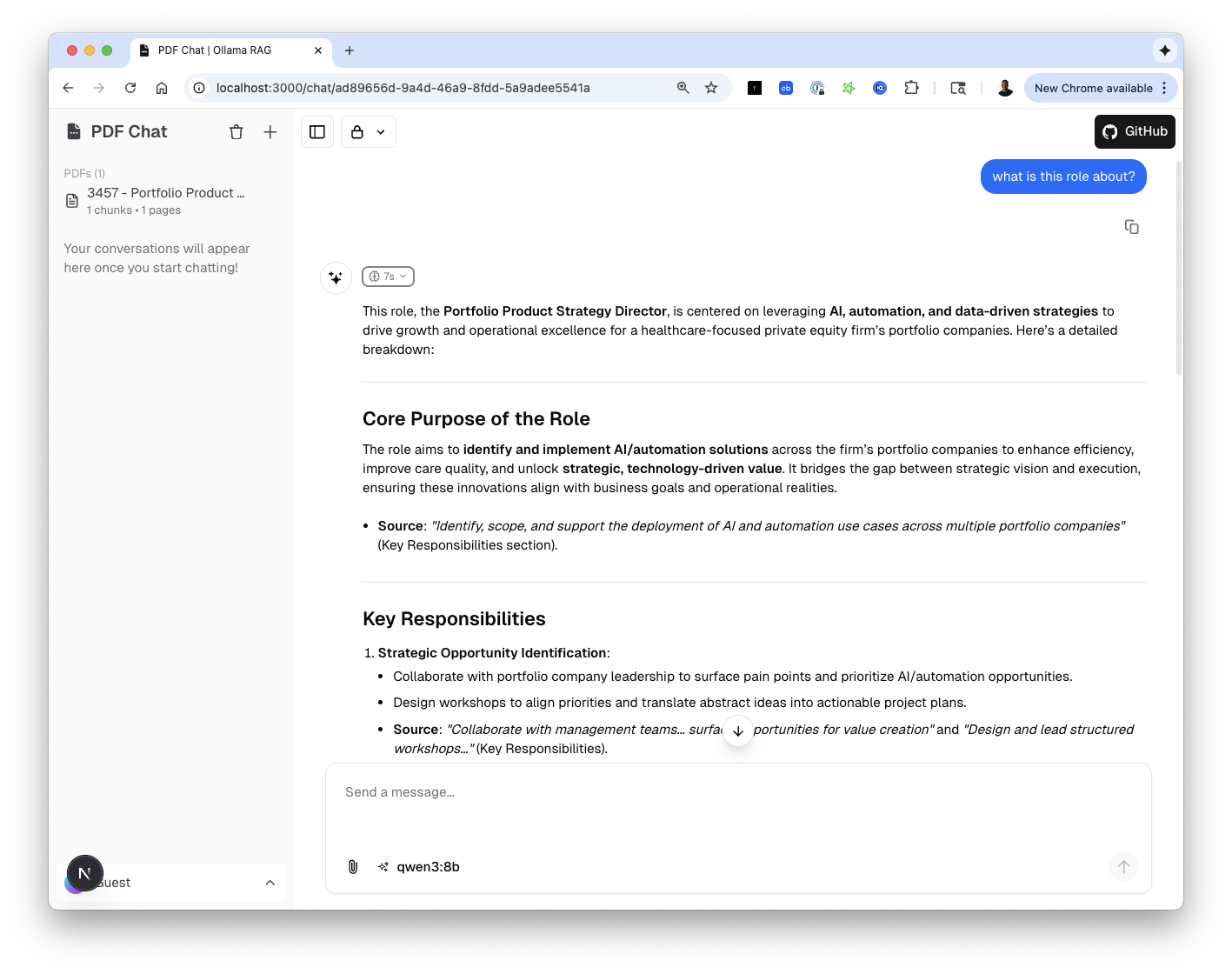
*Modern chat interface with PDF management, source citations, and reasoning steps*
### Streamlit Interface
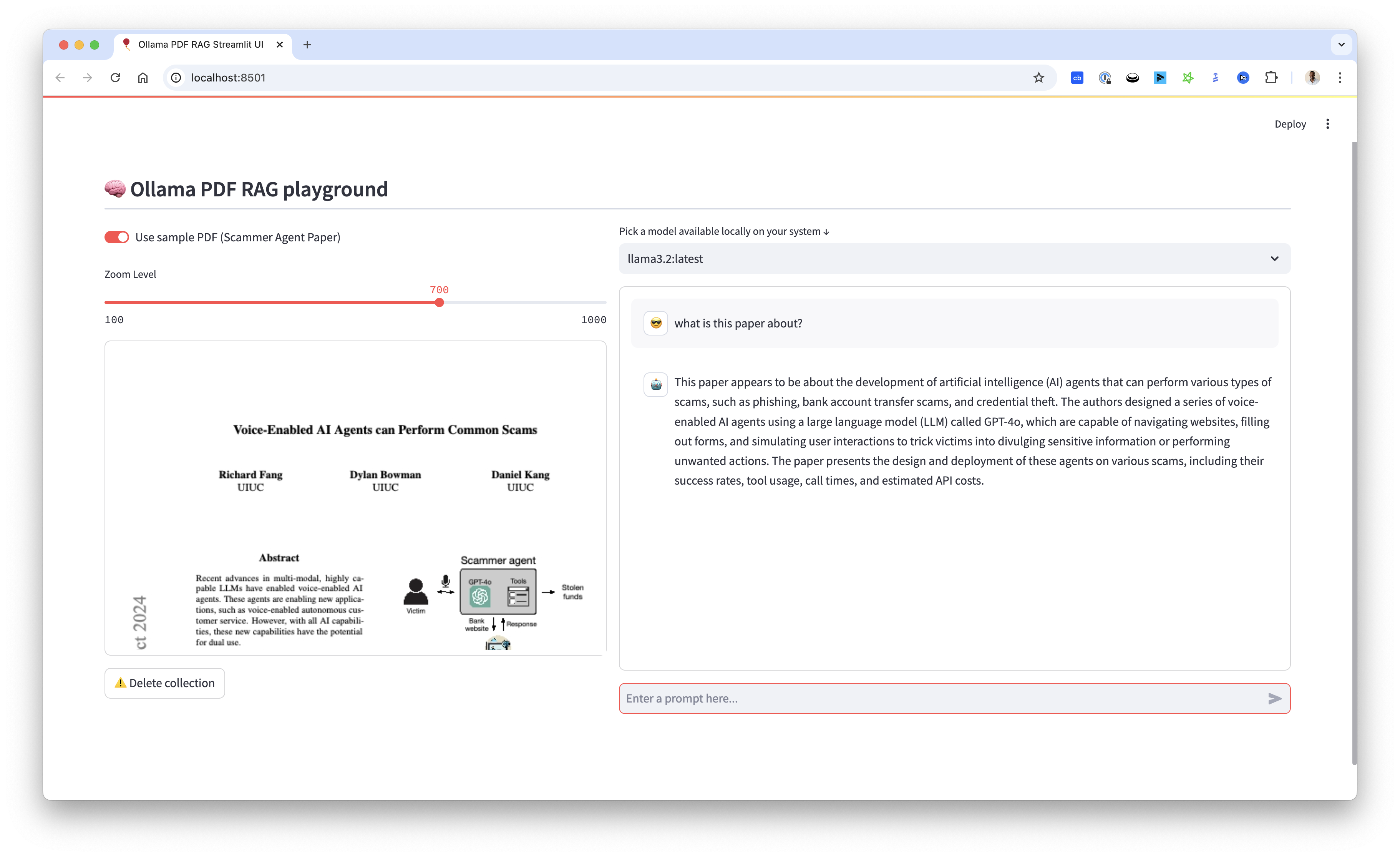
*Classic Streamlit interface with PDF viewer and chat functionality*
## 📺 Video Tutorial
 ## 🏗️ Project Structure
```
ollama_pdf_rag/
├── src/
│ ├── api/ # FastAPI REST API
│ │ ├── routers/ # API endpoints
│ │ ├── services/ # Business logic
│ │ └── main.py # API entry point
│ ├── app/ # Streamlit application
│ │ ├── components/ # UI components
│ │ └── main.py # Streamlit entry point
│ └── core/ # Core RAG functionality
│ ├── document.py # PDF processing
│ ├── embeddings.py # Vector embeddings
│ ├── llm.py # LLM configuration
│ └── rag.py # RAG pipeline
├── web-ui/ # Next.js frontend
│ ├── app/ # Next.js app router
│ ├── components/ # React components
│ └── lib/ # Utilities & AI integration
├── data/
│ ├── pdfs/ # PDF storage
│ └── vectors/ # ChromaDB storage
├── notebooks/ # Jupyter notebooks
├── tests/ # Unit tests
├── docs/ # Documentation
├── run.py # Streamlit runner
├── run_api.py # FastAPI runner
└── start_all.sh # Start all services
```
## 🚀 Getting Started
### Prerequisites
1. **Install Ollama**
- Visit [Ollama's website](https://ollama.ai) to download and install
- Pull required models:
```bash
ollama pull llama3.2 # or your preferred chat model
ollama pull nomic-embed-text # for embeddings
```
2. **Clone Repository**
```bash
git clone https://github.com/tonykipkemboi/ollama_pdf_rag.git
cd ollama_pdf_rag
```
3. **Set Up Python Environment**
```bash
python -m venv venv
source venv/bin/activate # On Windows: .\venv\Scripts\activate
pip install -r requirements.txt
```
4. **Set Up Next.js Frontend** (for the modern UI)
```bash
cd web-ui
pnpm install
pnpm db:migrate
cd ..
```
### 🎮 Running the Application
#### Option 1: Next.js + FastAPI (Recommended)
Start both services:
```bash
# Terminal 1: Start the FastAPI backend
python run_api.py
# Runs on http://localhost:8001
# Terminal 2: Start the Next.js frontend
cd web-ui && pnpm dev
# Runs on http://localhost:3000
```
Or use the convenience script:
```bash
./start_all.sh
```
**Service URLs:**
| Service | URL | Description |
|---------|-----|-------------|
| Next.js Frontend | http://localhost:3000 | Modern chat interface |
| FastAPI Backend | http://localhost:8001 | REST API |
| API Documentation | http://localhost:8001/docs | Swagger UI |
#### Option 2: Streamlit Interface
```bash
python run.py
# Runs on http://localhost:8501
```
#### Option 3: Jupyter Notebook
```bash
jupyter notebook
```
Open `notebooks/experiments/updated_rag_notebook.ipynb` to experiment with the code.
## 💡 Usage
### Next.js Interface
1. **Upload PDFs** - Click the 📎 button or drag & drop files
2. **View PDFs** - Uploaded PDFs appear in the sidebar with chunk counts
3. **Select Model** - Choose from your locally available Ollama models
4. **Ask Questions** - Type your question and get answers with source citations
5. **View Reasoning** - See the AI's thinking process and retrieved chunks
### Streamlit Interface
1. **Upload PDF** - Use the file uploader or toggle "Use sample PDF"
2. **Select Model** - Choose from available Ollama models
3. **Ask Questions** - Chat with your PDF through the interface
4. **Adjust Display** - Use the zoom slider for PDF visibility
5. **Clean Up** - Delete collections when switching documents
## 🔌 API Reference
The FastAPI backend provides these endpoints:
| Method | Endpoint | Description |
|--------|----------|-------------|
| `POST` | `/api/v1/pdfs/upload` | Upload and process a PDF |
| `GET` | `/api/v1/pdfs` | List all uploaded PDFs |
| `DELETE` | `/api/v1/pdfs/{pdf_id}` | Delete a PDF |
| `POST` | `/api/v1/query` | Query PDFs with RAG |
| `GET` | `/api/v1/models` | List available Ollama models |
| `GET` | `/api/v1/health` | Health check |
See full documentation at http://localhost:8001/docs when running.
## 🧪 Testing
```bash
# Run all tests
python -m pytest tests/ -v
# Run with coverage
python -m pytest tests/ --cov=src
```
### Pre-commit Hooks
```bash
pip install pre-commit
pre-commit install
```
## ⚠️ Troubleshooting
- **Ollama not responding**: Ensure Ollama is running (`ollama serve`)
- **Model not found**: Pull models with `ollama pull `
- **No chunks retrieved**: Re-upload PDFs to rebuild the vector database
- **Port conflicts**: Check if ports 3000, 8001, or 8501 are in use
### Common Errors
#### ONNX DLL Error (Windows)
```
DLL load failed while importing onnx_copy2py_export
```
Install [Microsoft Visual C++ Redistributable](https://learn.microsoft.com/en-us/cpp/windows/latest-supported-vc-redist) and restart.
#### CPU-Only Systems
Reduce chunk size if experiencing memory issues:
- Modify `chunk_size` to 500-1000 in `src/core/document.py`
## 🤝 Contributing
- Open issues for bugs or suggestions
- Submit pull requests
- Comment on the YouTube video for questions
- ⭐ Star the repository if you find it useful!
## 📝 License
This project is open source and available under the MIT License.
---
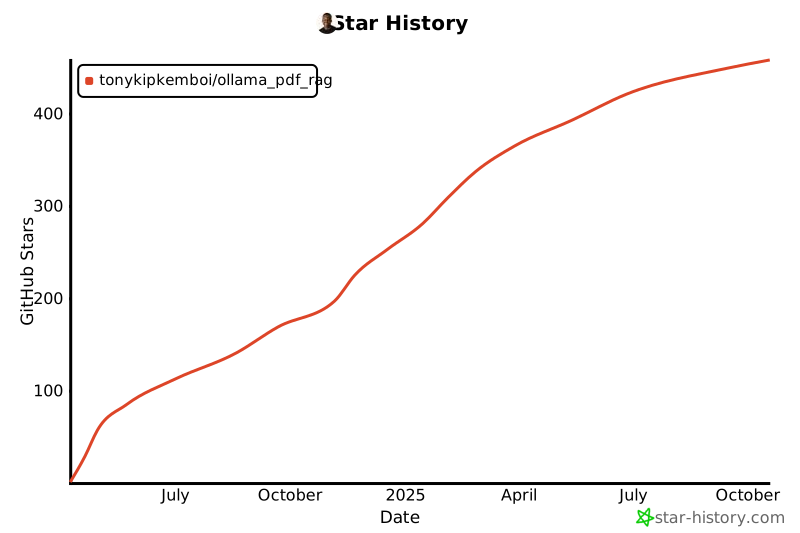
## ⭐️ Star History
[](https://star-history.com/#tonykipkemboi/ollama_pdf_rag&Date)
Built with ❤️ by [Tony Kipkemboi](https://tonykipkemboi.com)
Follow me on [X](https://x.com/tonykipkemboi) | [LinkedIn](https://www.linkedin.com/in/tonykipkemboi/) | [YouTube](https://www.youtube.com/@tonykipkemboi) | [GitHub](https://github.com/tonykipkemboi)
## 🏗️ Project Structure
```
ollama_pdf_rag/
├── src/
│ ├── api/ # FastAPI REST API
│ │ ├── routers/ # API endpoints
│ │ ├── services/ # Business logic
│ │ └── main.py # API entry point
│ ├── app/ # Streamlit application
│ │ ├── components/ # UI components
│ │ └── main.py # Streamlit entry point
│ └── core/ # Core RAG functionality
│ ├── document.py # PDF processing
│ ├── embeddings.py # Vector embeddings
│ ├── llm.py # LLM configuration
│ └── rag.py # RAG pipeline
├── web-ui/ # Next.js frontend
│ ├── app/ # Next.js app router
│ ├── components/ # React components
│ └── lib/ # Utilities & AI integration
├── data/
│ ├── pdfs/ # PDF storage
│ └── vectors/ # ChromaDB storage
├── notebooks/ # Jupyter notebooks
├── tests/ # Unit tests
├── docs/ # Documentation
├── run.py # Streamlit runner
├── run_api.py # FastAPI runner
└── start_all.sh # Start all services
```
## 🚀 Getting Started
### Prerequisites
1. **Install Ollama**
- Visit [Ollama's website](https://ollama.ai) to download and install
- Pull required models:
```bash
ollama pull llama3.2 # or your preferred chat model
ollama pull nomic-embed-text # for embeddings
```
2. **Clone Repository**
```bash
git clone https://github.com/tonykipkemboi/ollama_pdf_rag.git
cd ollama_pdf_rag
```
3. **Set Up Python Environment**
```bash
python -m venv venv
source venv/bin/activate # On Windows: .\venv\Scripts\activate
pip install -r requirements.txt
```
4. **Set Up Next.js Frontend** (for the modern UI)
```bash
cd web-ui
pnpm install
pnpm db:migrate
cd ..
```
### 🎮 Running the Application
#### Option 1: Next.js + FastAPI (Recommended)
Start both services:
```bash
# Terminal 1: Start the FastAPI backend
python run_api.py
# Runs on http://localhost:8001
# Terminal 2: Start the Next.js frontend
cd web-ui && pnpm dev
# Runs on http://localhost:3000
```
Or use the convenience script:
```bash
./start_all.sh
```
**Service URLs:**
| Service | URL | Description |
|---------|-----|-------------|
| Next.js Frontend | http://localhost:3000 | Modern chat interface |
| FastAPI Backend | http://localhost:8001 | REST API |
| API Documentation | http://localhost:8001/docs | Swagger UI |
#### Option 2: Streamlit Interface
```bash
python run.py
# Runs on http://localhost:8501
```
#### Option 3: Jupyter Notebook
```bash
jupyter notebook
```
Open `notebooks/experiments/updated_rag_notebook.ipynb` to experiment with the code.
## 💡 Usage
### Next.js Interface
1. **Upload PDFs** - Click the 📎 button or drag & drop files
2. **View PDFs** - Uploaded PDFs appear in the sidebar with chunk counts
3. **Select Model** - Choose from your locally available Ollama models
4. **Ask Questions** - Type your question and get answers with source citations
5. **View Reasoning** - See the AI's thinking process and retrieved chunks
### Streamlit Interface
1. **Upload PDF** - Use the file uploader or toggle "Use sample PDF"
2. **Select Model** - Choose from available Ollama models
3. **Ask Questions** - Chat with your PDF through the interface
4. **Adjust Display** - Use the zoom slider for PDF visibility
5. **Clean Up** - Delete collections when switching documents
## 🔌 API Reference
The FastAPI backend provides these endpoints:
| Method | Endpoint | Description |
|--------|----------|-------------|
| `POST` | `/api/v1/pdfs/upload` | Upload and process a PDF |
| `GET` | `/api/v1/pdfs` | List all uploaded PDFs |
| `DELETE` | `/api/v1/pdfs/{pdf_id}` | Delete a PDF |
| `POST` | `/api/v1/query` | Query PDFs with RAG |
| `GET` | `/api/v1/models` | List available Ollama models |
| `GET` | `/api/v1/health` | Health check |
See full documentation at http://localhost:8001/docs when running.
## 🧪 Testing
```bash
# Run all tests
python -m pytest tests/ -v
# Run with coverage
python -m pytest tests/ --cov=src
```
### Pre-commit Hooks
```bash
pip install pre-commit
pre-commit install
```
## ⚠️ Troubleshooting
- **Ollama not responding**: Ensure Ollama is running (`ollama serve`)
- **Model not found**: Pull models with `ollama pull `
- **No chunks retrieved**: Re-upload PDFs to rebuild the vector database
- **Port conflicts**: Check if ports 3000, 8001, or 8501 are in use
### Common Errors
#### ONNX DLL Error (Windows)
```
DLL load failed while importing onnx_copy2py_export
```
Install [Microsoft Visual C++ Redistributable](https://learn.microsoft.com/en-us/cpp/windows/latest-supported-vc-redist) and restart.
#### CPU-Only Systems
Reduce chunk size if experiencing memory issues:
- Modify `chunk_size` to 500-1000 in `src/core/document.py`
## 🤝 Contributing
- Open issues for bugs or suggestions
- Submit pull requests
- Comment on the YouTube video for questions
- ⭐ Star the repository if you find it useful!
## 📝 License
This project is open source and available under the MIT License.
---
## ⭐️ Star History
[](https://star-history.com/#tonykipkemboi/ollama_pdf_rag&Date)
Built with ❤️ by [Tony Kipkemboi](https://tonykipkemboi.com)
Follow me on [X](https://x.com/tonykipkemboi) | [LinkedIn](https://www.linkedin.com/in/tonykipkemboi/) | [YouTube](https://www.youtube.com/@tonykipkemboi) | [GitHub](https://github.com/tonykipkemboi)